.png?width=500&height=131&name=horiz-onwhite-noslogan%20(1).png)
If you are new to the EVA System and have not set a password on an EVA device or the EVA Portal, you will need to complete the Set up process first.
| Note: If you do not have a user for the EVA System, please reach out to support@ligermedical.com |
Activate a New User
- Access the EVA Portal by entering the following link in your browser: https://eva.mobileodt.com/
- Click on “Activate your user”
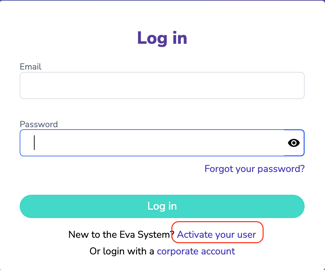
- Enter the email associated with your EVA User account.
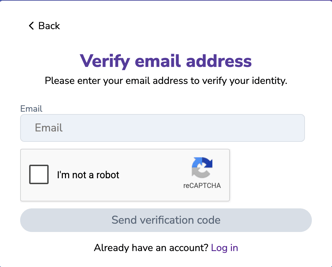
- Click on ‘Send activation code’.
- An email will be sent with a code that needs to be entered in the next screen.
.jpeg?width=439&height=260&name=rtaImage%20(22).jpeg)
- Enter the activation code you received.
.jpeg?width=302&height=365&name=rtaImage%20(23).jpeg)
- If you did not receive an email check your spam and trash folders.
- After entering the activation code you will be requested to select a password.
- The password requires a minimum of eight characters including a capital letter, a lowercase letter, one number and one special character.
- This password will be used to access your EVA account, both on the portal and on EVA devices.